
Introduction
After successfully registering under the Goods and Services Tax (GST) system, every registered taxpayer receives a GST Registration Certificate, officially issued in Form GST REG-06. This certificate serves as proof that the business is legally registered under GST and contains important details such as the GST Identification Number (GSTIN), legal business name, business address, and registration type.
Many taxpayers search online for gst certificate download, download GST certificate, or registration certificate because they need the certificate for opening bank accounts, participating in business tenders, completing compliance requirements, or sharing proof of GST registration with customers and vendors.
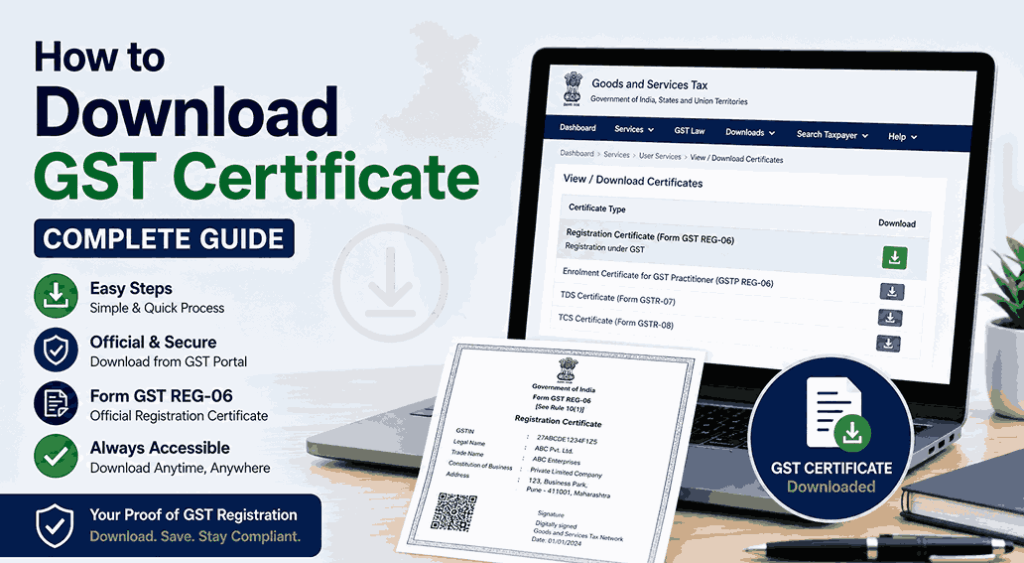
The good news is that downloading your GST Registration Certificate is simple. The certificate is available online through the official GST Portal and can be downloaded anytime after logging into your account. The Government does not issue a physical copy of the certificate.
This complete guide explains everything you need to know about GST certificate download, including the download process, certificate contents, common issues, and frequently asked questions.
What is a GST Registration Certificate?
A GST Registration Certificate is the official document issued after a taxpayer’s GST registration is approved.
It confirms that a business is registered under the GST system and is authorized to conduct GST-compliant business activities.
The certificate is issued in Form GST REG-06 and is available only in digital format through the GST Portal.
Why is a GST Registration Certificate Important?
A GST Registration Certificate serves as official proof of GST registration.
It is commonly required for:
- Business verification
- Opening current bank accounts
- Government tenders
- Vendor onboarding
- Business licensing
- Compliance documentation
- Customer verification
- Tax-related record keeping
Having an updated certificate readily available can simplify many business processes.
Who Can Download a GST Certificate?
A GST Registration Certificate can be downloaded by:
- Sole Proprietors
- Partnership Firms
- Limited Liability Partnerships (LLPs)
- Private Limited Companies
- Public Limited Companies
- One Person Companies (OPCs)
- Registered Trusts
- Other GST-registered entities
Only the registered taxpayer (or authorized user) can download their own certificate after logging into the GST Portal.
When Can You Download Your GST Certificate?
You can download your certificate after:
- GST registration is approved.
- GSTIN has been issued.
- You have access to your GST Portal login credentials.
If your registration information is changed and approved, the new. The registration certificate can be downloaded from the portal as well.
How to Download GST Certificate
The certificate can be downloaded very quickly and easily.
Step 1: Visit the Official GST Portal
Open the official GST Portal in your web browser.
Step 2: Log In to Your Account
Click Login and enter:
- Username
- Password
- CAPTCHA
Your GST dashboard will open once authentication is completed successfully.
Step 3: Open User Services
From the dashboard, navigate to:
Services → User Services → View/Download Certificates
This section displays all certificates issued by the GST authorities.
Step 4: Select the Registration Certificate
Locate your GST Registration Certificate (Form GST REG-06) in the list.
If multiple certificates are available, the latest certificate generally appears according to its issue date.
Step 5: Click Download
Click the Download icon.
The certificate will be downloaded as a digitally signed PDF file.
Information Available in the GST Registration Certificate
Your registration certificate generally contains:
- GST Identification Number (GSTIN)
- Legal Name of Business
- Trade Name
- Constitution of Business
- Principal Place of Business
- Additional Places of Business (if applicable)
- Date of Registration
- Type of Registration
- Jurisdiction
- Digital Signature or Deemed Approval Information
These details help establish the authenticity of the registered taxpayer.
What is Form GST REG-06?
Form GST REG-06 is the official GST Registration Certificate issued after approval of GST registration.
It serves as legal evidence that the taxpayer is registered under the GST Act.
The certificate remains valid unless the registration is cancelled, surrendered, or otherwise becomes invalid under applicable GST provisions.
Can You Download a GST Certificate Without Logging In?
No.
The GST Portal requires users to log in before downloading their own Registration Certificate.
However, if you want to verify another business, you can use the public taxpayer search facility to confirm its GST registration details. This public search does not provide the downloadable certificate.
How to Download an Updated GST Certificate After Amendment
If you have updated information such as:
- Business address
- Trade name
- Authorized signatory
- Business constitution
and the amendment has been approved, the revised Registration Certificate can be downloaded from the same View/Download Certificates section.
Common Problems During GST Certificate Download
Occasionally, users encounter difficulties downloading their certificates.
Login Issues
Possible reasons include:
- Incorrect username
- Wrong password
- CAPTCHA errors
Verify your login credentials before trying again.
Certificate Not Available
Possible reasons include:
- Registration is still under processing.
- Amendment has not yet been approved.
- Registration has been cancelled.
PDF Not Opening
If the downloaded file does not open:
- Make sure you’re using the most recent PDF reader.
- Download the file again if necessary.
Digital Signature Warning
Some PDF applications may initially display the certificate’s digital signature as “not verified.”
In most cases, this relates to local PDF trust settings rather than the validity of the certificate itself. In PDF readers that are compatible, the GST Portal provides instructions on how to verify trusted signatures.
Benefits of Downloading Your GST Certificate
For Business Owners
- Proof of GST registration
- Easier vendor onboarding
- Faster banking documentation
- Business verification
- Better compliance
For Customers
Customers can:
- Confirm business authenticity
- Verify GST registration
- Build trust before transactions
For Accountants
Accountants benefit by:
- Maintaining compliance records
- Verifying taxpayer details
- Preparing documentation
- Supporting audits
Best Practices for Managing Your GST Certificate
Follow these recommendations.
- Put a digital copy in a safe place.
- Print a copy if required for business display.
- Download the updated certificate after approved amendments.
- Keep your GST Portal login credentials secure.
- Periodically verify that your registration details remain accurate.
Common Mistakes to Avoid
Avoid these common errors.
- Using unofficial websites for certificate downloads.
- Sharing GST Portal login credentials.
- Forgetting to download the revised certificate after approved amendments.
- Assuming a physical certificate will be mailed by the Government.
- Ignoring updates to registration details.
Following official procedures helps protect your business records.
Frequently Asked Questions (FAQs)
What is GST certificate download?
GST certificate download refers to downloading the official GST Registration Certificate (Form GST REG-06) from the GST Portal after logging into your account.
How can I download my GST certificate?
Log in to the GST Portal and navigate to:
Services → User Services → View/Download Certificates
Then click the download icon next to your Registration Certificate.
Is the GST Registration Certificate available offline?
No. The Government issues the Registration Certificate digitally. There is no physical certificate issued by the GST authorities.
Can I download my certificate after changing my business address?
Yes. Once the amendment is approved, the updated Registration Certificate becomes available for download from the GST Portal.
Can I download another company’s GST certificate?
No. You can only download your own certificate after logging into your account. To verify another business, use the public taxpayer search facility on the GST Portal.
Is GST certificate download free?
Yes. Downloading your Registration Certificate from the official GST Portal is completely free.
Conclusion
Understanding the GST certificate download process is essential for every registered taxpayer. The GST Registration Certificate is an important legal document that confirms your business is registered under the GST system and may be required for banking, vendor onboarding, compliance, and other official purposes.
The process to download GST certificate is straightforward: simply log in to the official GST Portal, navigate to Services → User Services → View/Download Certificates, and download the latest registration certificate (Form GST REG-06). If your registration details are amended in the future, remember to download the updated certificate after the changes are approved.
By keeping your certificate secure and up to date, you can ensure smoother business operations and demonstrate compliance whenever proof of GST registration is required.